Accounting & Tax · 7 min read
Invoice records: retention, backups and a usable audit trail
Keeping invoices is easy. Being able to find a specific one from four years ago, with the payment it relates to and the credit note that adjusted it, is the part that takes a system.
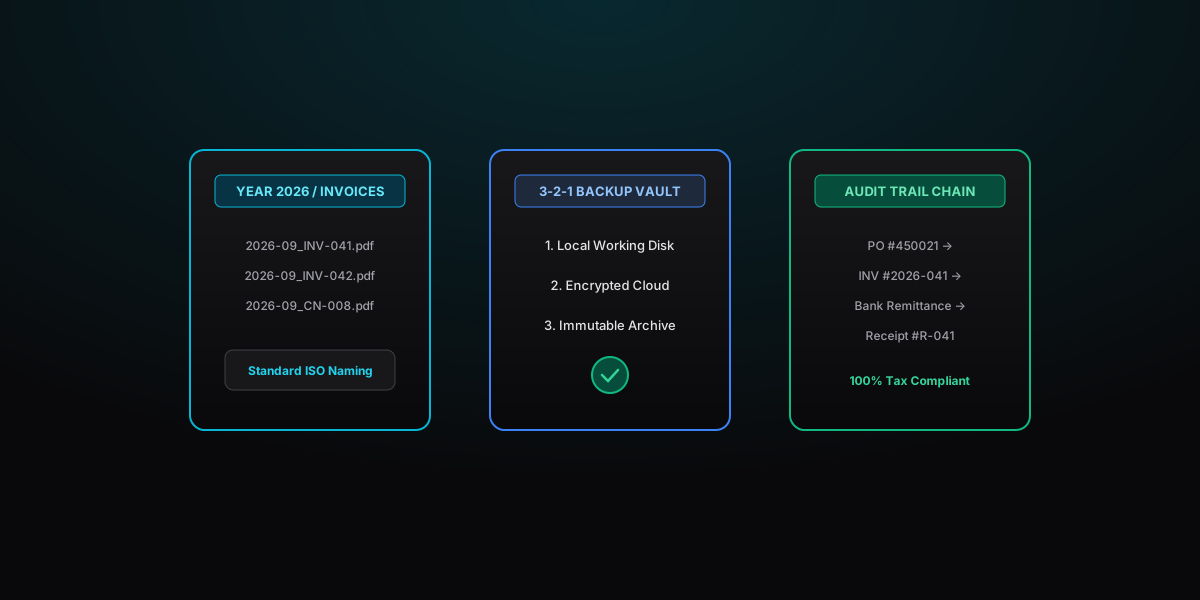
Most record-keeping advice frames this as a compliance obligation. It is, but the day-to-day value is more immediate: a client queries a charge from two years ago, an accountant asks why a number moved, a dispute turns on what was agreed. In every case the cost is measured in how long it takes you to produce the document.
Practical application
Invoice records: retention, backups and a usable audit trail in practice
Keeping invoices is easy. Being able to find a specific one from four years ago, with the payment it relates to and the credit note that adjusted it, is the part that takes a system.
- Requirement
- Clear compliance and documentation
- Action item
- Follow standard accounting rules and verify with client
Original diagram
Invoice records: retention, backups and a usable audit trail decision flow
- 1How long to keep things
- 2What to keep, not just the invoice
- 3Naming and folder structure
- 4Backups that actually work
How long to keep things
There is no universal answer, and anyone who gives you a single number is describing one country's rules. Retention periods differ by jurisdiction, by tax type, and sometimes by the nature of the transaction. Beyond tax, other clocks may run longer:
The practical rule: find out what applies where you operate, and where two requirements differ, keep to the longer one. Storage is cheap; reconstructing a destroyed record is not.
- Contract limitation periods, during which a claim could still be brought
- Warranty or guarantee obligations on goods and some services
- Grant, subsidy or public contract conditions, which often impose their own retention terms
- Employment and payroll records, where subcontractor billing is involved
What to keep, not just the invoice
An invoice on its own answers very few questions. The useful unit is the chain around it:
The test is simple: could someone who knows nothing about the job start at the bank entry and work back to the agreement, without asking you anything?
- The quote, purchase order or signed agreement that authorised the work
- Any written scope changes or approvals
- The invoice as sent, in the exact form the client received
- Evidence of when and to whom it was sent
- Any credit notes or corrections, referencing the original
- The payment record and the matching bank entry
- Correspondence about disputes or agreed adjustments
Naming and folder structure
Search only works if your filenames are consistent. A structure that holds up over years:
2026/ClientName/2026-09-08_NS-2026-151_ClientName_3600.pdf
Why each part is there:
Use the same convention for credit notes with a CN- prefix, and keep payment evidence in the same folder rather than a separate one. A single folder per client per year is easier to maintain than a deeply nested structure nobody remembers the logic of.
- ISO date first (YYYY-MM-DD) so files sort chronologically in any system
- Invoice number so you can find a document from a reference alone
- Client name so a folder-less search still works
- Amount so you can match a bank line to a document visually
Backups that actually work
Two copies in the same place is one copy. A workable minimum for a small business:
The point most people miss is that cloud sync is not a backup. If files are deleted or encrypted locally, sync propagates that. Version history helps, but only within its retention window.
Test a restore once a year. Pick an invoice at random from three years ago and try to produce it, plus its payment record, in under five minutes. Most people discover a gap the first time they try this, which is exactly the point of doing it when nothing is at stake.
- A working copy you use day to day
- A synced cloud copy, which protects against device loss
- An offline or separately-held copy, updated periodically, which protects against account compromise and against sync faithfully replicating a deletion
What a clean audit trail looks like
Three signals matter more than volume of documentation:
- No gaps in invoice numbering. If a number was cancelled, the credit note explaining it should sit in its place. Missing numbers invite questions.
- Every adjustment documented. A credit note with a stated reason and a reference to the original invoice.
- Payments reconcile to invoices. Unmatched receipts sitting in a bank account are the most common thing that turns a routine review into a longer one.
Housekeeping worth doing
None of this takes long once it is set up. The work is almost entirely in deciding on a convention and then applying it consistently, which is also why it is so often postponed until the moment it is needed.
- Quarterly: file any stray documents, reconcile unmatched payments, check the numbering sequence is unbroken.
- Annually: close the year's folder, export from any third-party software, verify a restore, and refresh your offline copy.
- On any system change: export everything from the old system before you migrate, not afterwards.
- Before disposing of anything: confirm the retention period that applies, and keep a note of what was disposed of and when.
Common questions
Helpful clarifications
How long should I keep invoices?
Retention periods are set by law and differ substantially between countries, and sometimes between taxes within the same country. Contract limitation periods, warranty obligations and grant funding conditions can all require you to keep records longer than the tax rules alone. Check the requirements that apply to your business and, where two rules conflict, follow the longer one.
Can I throw away paper invoices if I have scanned them?
Many jurisdictions permit digital-only record keeping provided the copy is complete, legible and cannot be altered without trace, but the conditions vary and some categories of document are treated differently. Before disposing of originals, confirm what your local rules require and keep a documented scanning process. Where there is doubt about a particular document, keeping the original costs very little.
What counts as an audit trail for invoicing?
A chain that connects each sale from agreement to money received: the quote or purchase order, the invoice, any credit notes, the payment record, and the bank entry. Someone unfamiliar with the work should be able to start at any point in that chain and reach the others without asking you questions. Gaps in invoice numbering, unexplained credits and payments that do not tie to an invoice are the things that attract attention.
Is storing invoices in my email inbox good enough?
It is a weak system. Email accounts get closed, providers change policies, search fails on documents with inconsistent subject lines, and you lose access entirely if the account is compromised. Keep a dedicated invoice archive organised by year and client, with the email thread as supporting context rather than as the primary record.
What file format should I archive invoices in?
A text-based PDF is the practical default: widely readable, self-contained, and searchable without OCR. Avoid archiving only in a proprietary editable format or as a photograph of a screen. If you also produce structured e-invoice data, keep that file alongside the PDF, because in some systems the structured version is the authoritative record.